


Try Notetracks Today!
The platform for creators to review and collaborate on their audio projects.
 Start Free


Share
A guide for artists, producers, and bands sending feedback to their mix engineer — written so your next round is your last.
You just got the first mix back from your engineer. You listen to it three times. Something feels off, but you can't quite name it. So you fire back an email: "Sounds great overall - can you make the vocals a little more upfront and the drums punchier? Also the chorus feels small."
Three days later, version 2 lands. The vocals are louder, the drums are hitting harder, but somehow the chorus still feels small. And now the bass sounds weird.
You're frustrated. Your engineer's frustrated. You're on round 4 and the song still isn't right.
This isn't a talent problem. It's a feedback problem. And it's fixable.
Most artists write mix notes the way they think about music: emotionally and holistically. "It needs more energy." "The vibe is off." "Something feels muddy."
Engineers don't work that way. They work in dB, frequencies, instruments, and timecodes. When you say "more energy," they have to guess: do you mean louder vocals? Brighter cymbals? More compression on the master bus? A different reverb on the snare?
Every guess is a wasted revision round. Every wasted round is more time, more money, and more frustration.
Good mix notes translate your emotional reaction into specific, actionable instructions. That's it. You don't need to know what a high-pass filter is. You just need to be specific about what you're hearing, where you're hearing it, and what you want instead.
Vague: "The chorus feels small."Useful: "At 1:42, the chorus doesn't feel as big as the chorus at 0:48."
Every note needs a timestamp. Minutes and seconds. If a note covers a range, give the start and end (1:42–2:05). Engineers work in timelines. Meet them where they work.
Vague: "Drums sound off."Useful: "At 2:15, the snare sounds too thin compared to the verse snare at 0:30."
Name the instrument. Name the section. Compare it to a part of the song that sounds right, if you can. Engineers can fix anything they can locate.
Vague: "Vocals too quiet."Useful: "At 1:08, raise the lead vocal so it sits on top of the synth pad. I want to hear every word clearly."
"Too quiet" tells the engineer what's wrong. Telling them where you want it to land tells them what to do. The second version saves a round trip.
Vague: "Make it sound more modern."Useful: "I want the vocal to sound like the chorus of [reference track]. Punchy, present, slight reverb tail."
Send a Spotify or YouTube link with a timestamp. Reference tracks short-circuit hours of back-and-forth. They give your engineer instant context for words like bright, warm, modern, vintage, or lo-fi - words that mean ten different things to ten different people.
Copy this into an email or doc and fill it in:
TRACK: [Song Title - Mix v1]
DATE LISTENED: [Date]
LISTENED ON: [Headphones / car / monitors / phone — list all]

OVERALL IMPRESSION:
[1–2 sentences. What's working? Start with what you like.]

REFERENCE TRACKS:
- [Artist - Song] — for [vocal tone / drum punch / overall vibe]
- [Artist - Song] — for [low-end / space / energy]

NOTES BY SECTION:

INTRO (0:00 – 0:24)
- [Timestamp] [Instrument]: [What you hear] → [What you want]

VERSE 1 (0:24 – 0:48)
- [Timestamp] [Instrument]: [What you hear] → [What you want]

CHORUS 1 (0:48 – 1:12)
- [Timestamp] [Instrument]: [What you hear] → [What you want]

[…continue for each section…]

NOTES BY INSTRUMENT (anything not section-specific):

VOCALS:
- [Note]

DRUMS:
- [Note]

BASS:
- [Note]

EFFECTS / MIX BUS:
- [Note]

PRIORITIES:
1. [Most important fix]
2. [Second]
3. [Third]
Two things this template forces that loose emails don't:
Bad: "The vocals need work."Good: "0:48 – 1:12 (chorus): Lead vocal feels buried under the synth. Want it 1–2dB louder, similar to the verse vocal level at 0:30."
Bad: "More punch on the drums."Good: "Throughout: Kick drum lacks low-end weight. Reference: [Track] – I love how the kick hits in the chorus. Currently mine feels like a click; I want it to feel like a thud."
Bad: "The whole thing sounds muddy."Good: "1:30 – 2:00: There's a build-up of low-mid frequencies (around 200–400Hz, but trust your ears) that's making everything blur together. Particularly noticeable on the second verse where the bass and rhythm guitar overlap."
Bad: "Master is too quiet."Good: "Compared to [reference track], my mix sounds about 3dB quieter. I'd like it to feel as loud as the reference, but please don't sacrifice dynamic range to get there."
You don't need to know what 200–400Hz means. You can write "the low-mid stuff feels stacked" and your engineer will get it. The point is specificity, location, and a goal.
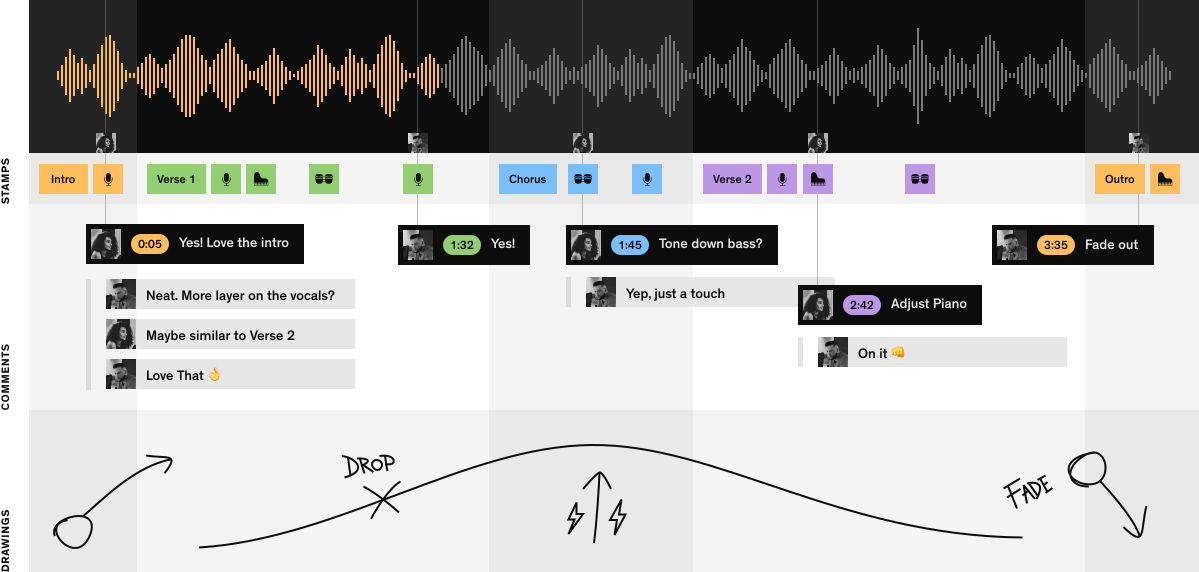
The template above works. But it has a flaw: you're listening, then pausing, then typing a timestamp, then typing a note, then unpausing, then forgetting where you were.
A better workflow: drop your mix into a tool that lets your engineer (and you) leave timestamped comments directly on the waveform. You click where you hear the issue, you type the note, it stays attached to that exact moment. Your engineer sees a visual map of every comment along the timeline. They click a comment, they're at the right second.
That's what we built Notetracks for. Drop in your WAV or MP3, share a link with your engineer (no account required for them), and every comment lands as a timestamped pin on the waveform. When the engineer's done, they export the comments as markers directly into Pro Tools, Adobe Audition, or Hindenburg — no copy-pasting timestamps.
Bands using this workflow typically cut revision rounds in half. Not because the feedback is better - because nothing gets lost in translation.
If you want to try it on your next mix, there's a free plan here. No credit card.
Your next mix should be the last round. Now you've got the structure to make that happen.
Found this useful? Bookmark this page and share it with a friend.

Be the first to know about the latest news, posts and features.


